timer.ino
/*
Lucas Dahl
60 minute countdown for 4 digit 7 segment led display
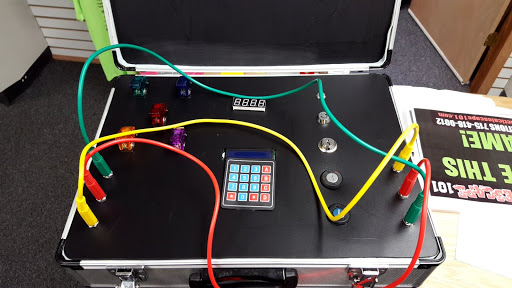
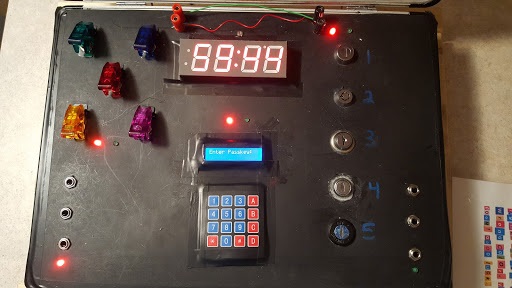
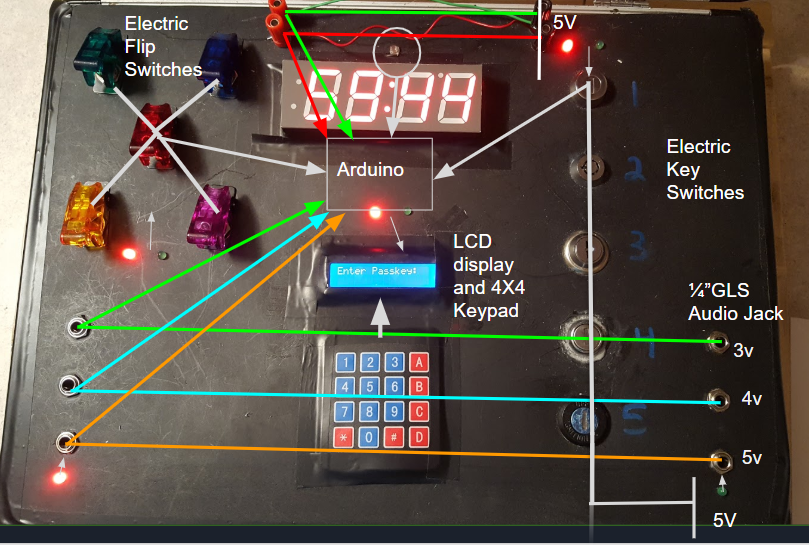
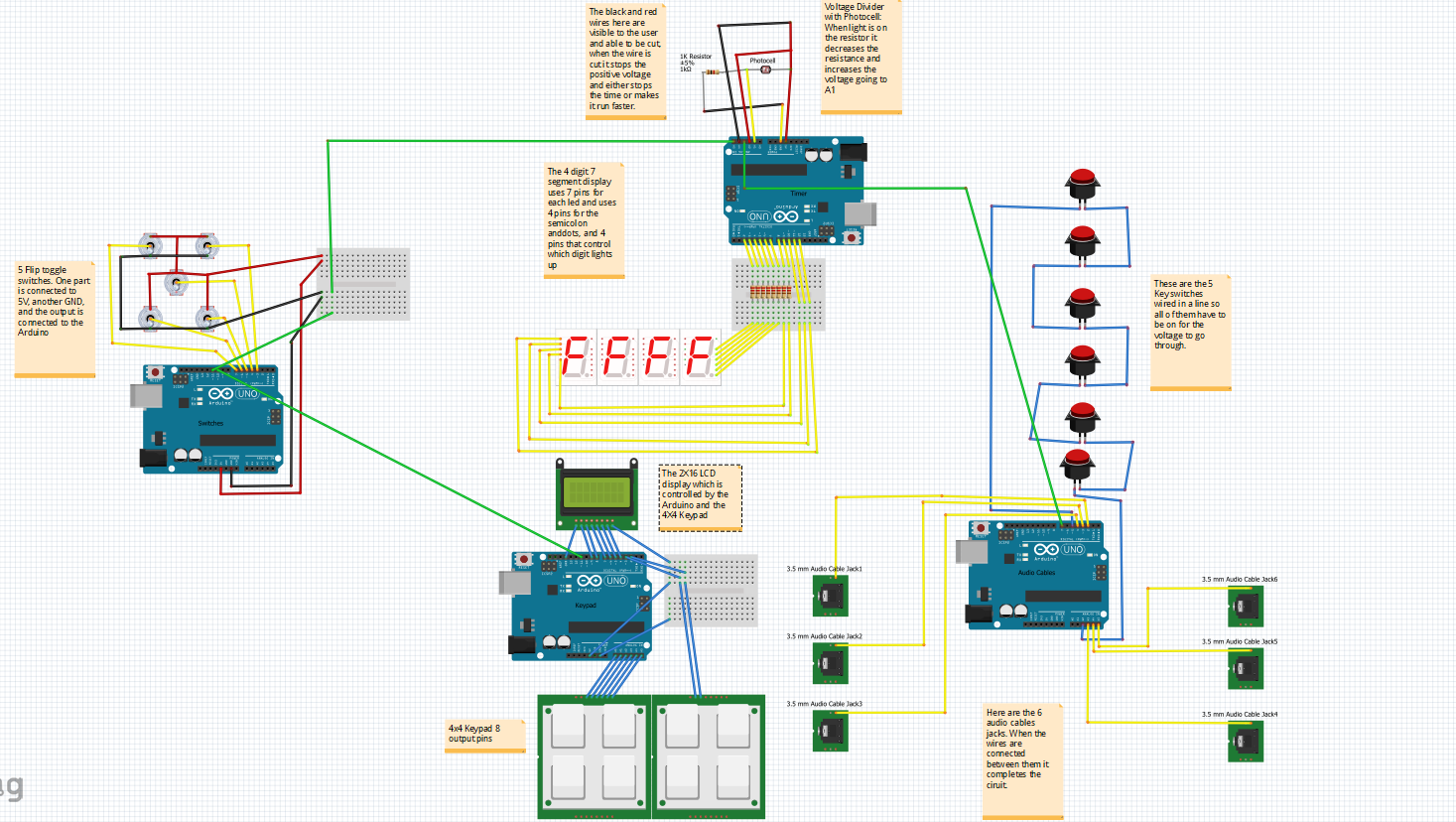
Used for the suitcase bomb design, also uses code for the 7 digit code also on github
The output pins for the other arduinos will go into A1, safe, death, A5, and A3
*/
#include <TimerOne.h>


int sensorPin = A1;
int musicer = A0;
int sensorValue = 0;  // variable to store the value coming from the sensor
int resistorValue = 0;
int starter =0 ;
int safe = A2;
int death = A4;

// pins for the 4 digit 7 segment led, these can change depending on which is orders so look at the data sheet for the led.
int a = 2;
int b = 3;
int c = 4;
int d = 5;
int e = 6;
int f = 7;
int g = 8;
int p = 9;
int d4 = 10;
int d3 = 11;
int d2 = 12;
int d1 = 13;

// n is the number that is displayed, the countdown function is on the bottom but if you wanted a different countdown then 60 min then change this value.
long n = 5959;
int x = 100;
//Used to change the speed of the coundown, if you add more programs to this code the countdown will be slower.
int timing_adjust = 5;

//A larger adjust for speed, if this is changed to 0 then it will count down 10 times faster. use this as a punishment for doing something wrong
int count = 9;

int minute = 0;
int stopper = 0;

//flip is the flipswitches part of the suitcase bomb, pass is the 7 digit passkey, and plug is the audio plug part.
int flip = 0;
int pass = 0;
int plug = 0;

// variable to change the count
int change_count = 9;

//the two pins that connect to the wire that needs to be cut, one stops the time and the other increases the speed.
int readDeath = 0;
int readSafe = 0;

int nostop = 0;
int toners = 0;
int ending = 0;

void setup()
{
  Serial.begin(9600);

  pinMode(d1, OUTPUT);
  pinMode(d2, OUTPUT);
  pinMode(d3, OUTPUT);
  pinMode(d4, OUTPUT);
  pinMode(a, OUTPUT);
  pinMode(b, OUTPUT);
  pinMode(c, OUTPUT);
  pinMode(d, OUTPUT);
  pinMode(e, OUTPUT);
  pinMode(f, OUTPUT);
  pinMode(g, OUTPUT);
  pinMode(p, OUTPUT);
  pinMode(musicer, OUTPUT);

  Timer1.initialize(100000);
  Timer1.attachInterrupt( countdown );
}
/***************************************/
void loop()
{
  //The timer will only start when the starter changes, this is so that when the bomb opens up the photoresistor will detect the light and start the bomb
  if (starter ==0)
  {
    delay(1000);
    sensorValue = analogRead(sensorPin);
    if (sensorValue > 40)
     {
        starter = 1;
     }
  }
  flip = analogRead(A5);
  readDeath = analogRead(death);
  pass = analogRead(A3);
  readSafe = analogRead(safe);
  if (readDeath < 800)
  {
   change_count = 1;
   nostop = 1;
  }

  //baseling for the inputs for the other arduinos
  if (flip > 900 && pass > 800)
  {
    if (readDeath < 800)
    {
       change_count = 1;
       if (readSafe <900 && n == 0001)
       {
        n = 1;
        stopper = 1;
        if (toners == 0){
        winner();
        toners = 1;
       }

       }
    }
    //The time will stop only when the conditions are set from the other arduios and then the wire is cut
    if(nostop == 0)
    {
      if (readSafe < 900 )
      {
        stopper = 1;
        if (toners == 0){
        winner();
        toners = 1;
        }
      }
    }
  }
  //If the conditions are not set and the time runs out they lose
  if(starter == 1 && n == 0 && toners == 0)
  {
   loser();
   toners = 1;
  }
  //when the timer counts down at the 30min 15min marks it will play a tune to alert them
  if(n == 3000)
  {
    tone(musicer, 1000);
    delay(1000);
    noTone(musicer);
  }
   if(n == 1500)
  {
    tone(musicer, 1000);
    delay(1000);
    noTone(musicer);
  }
  //at the last 5 seconds it will beep and then play a heart beat animation and tune
   if(n == 5 && ending == 0)
  {
    tone(musicer, 1000);
    delay(10);
    noTone(musicer);
    ending = 1;
  }
   if(n == 4 && ending == 1)
  {
    tone(musicer, 1000);
    delay(10);
    noTone(musicer);
    ending = 2;
  }
   if(n == 3 && ending == 2)
  {
    tone(musicer, 1000);
    delay(10);
    noTone(musicer);
    ending = 3;
  }
   if(n == 2 && ending == 3)
  {
    tone(musicer, 1000);
    delay(10);
    noTone(musicer);
    ending = 0;
  }

 //This loops through the different digits and displays them by using a modulus fuction to specifiy the digit
  clearLEDs();//clear the leds
  digits(0);//turns on the first digit
  numbers((n/1000));// get the value of first digit
  delay(timing_adjust);//delay 5ms

  clearLEDs();//clear leds
  digits(1);//Light up second digit
  numbers((n%1000)/100);// get the value of second digit using modulus
  delay(timing_adjust);//delay 5ms

  clearLEDs();//clear the leds
  digits(2);//Light up third digit
  numbers(n%100/10);//get the 3rd digit
  delay(timing_adjust);//delay 5ms

  clearLEDs();//clear the leds
  digits(3);//Light up fourth digit
  numbers(n%10);//Get the value of fourth digit
  delay(timing_adjust);//delay 5ms
}
/**************************************/
void digits(int x) //light up a 7-segment display
{
  //The 7-segment LED display is a common-cathode one. So also use digitalWrite to  set d1 as high and the LED will go out
  digitalWrite(d1, HIGH);
  digitalWrite(d2, HIGH);
  digitalWrite(d3, HIGH);
  digitalWrite(d4, HIGH);

  switch(x)
  {
    case 0:
    digitalWrite(d1, LOW);//Light digit one
    break;
    case 1:
    digitalWrite(d2, LOW); //Light digit two
    digitalWrite(p, HIGH);
    break;
    case 2:
    digitalWrite(d3, LOW); //Light digit three
    break;
    default:
    digitalWrite(d4, LOW); //Light digit four
    break;
  }
}
//Simplifies the digit leds that need to be powered by setting leds to a given number
void numbers(int x)
{
  switch(x)
  {
    default:
    zero();
    break;
    case 1:
    one();
    break;
    case 2:
    two();
    break;
    case 3:
    three();
    break;
    case 4:
    four();
    break;
    case 5:
    five();
    break;
    case 6:
    six();
    break;
    case 7:
    seven();
    break;
    case 8:
    eight();
    break;
    case 9:
    nine();
    break;
  }
}
void clearLEDs() //clear the 7-segment display screen
{
  digitalWrite(a, LOW);
  digitalWrite(b, LOW);
  digitalWrite(c, LOW);
  digitalWrite(d, LOW);
  digitalWrite(e, LOW);
  digitalWrite(f, LOW);
  digitalWrite(g, LOW);
  digitalWrite(p, LOW);
}

void zero() //the 7-segment led display 0
{
  digitalWrite(a, HIGH);
  digitalWrite(b, HIGH);
  digitalWrite(c, HIGH);
  digitalWrite(d, HIGH);
  digitalWrite(e, HIGH);
  digitalWrite(f, HIGH);
  digitalWrite(g, LOW);
}

void one() //the 7-segment led display 1
{
  digitalWrite(a, LOW);
  digitalWrite(b, HIGH);
  digitalWrite(c, HIGH);
  digitalWrite(d, LOW);
  digitalWrite(e, LOW);
  digitalWrite(f, LOW);
  digitalWrite(g, LOW);
}

void two() //the 7-segment led display 2
{
  digitalWrite(a, HIGH);
  digitalWrite(b, HIGH);
  digitalWrite(c, LOW);
  digitalWrite(d, HIGH);
  digitalWrite(e, HIGH);
  digitalWrite(f, LOW);
  digitalWrite(g, HIGH);
}
void three() //the 7-segment led display 3
{
  digitalWrite(a, HIGH);
  digitalWrite(b, HIGH);
  digitalWrite(c, HIGH);
  digitalWrite(d, HIGH);
  digitalWrite(e, LOW);
  digitalWrite(f, LOW);
  digitalWrite(g, HIGH);
}

void four() //the 7-segment led display 4
{
  digitalWrite(a, LOW);
  digitalWrite(b, HIGH);
  digitalWrite(c, HIGH);
  digitalWrite(d, LOW);
  digitalWrite(e, LOW);
  digitalWrite(f, HIGH);
  digitalWrite(g, HIGH);
}

void five() //the 7-segment led display 5
{
  digitalWrite(a, HIGH);
  digitalWrite(b, LOW);
  digitalWrite(c, HIGH);
  digitalWrite(d, HIGH);
  digitalWrite(e, LOW);
  digitalWrite(f, HIGH);
  digitalWrite(g, HIGH);
}

void six() //the 7-segment led display 6
{
  digitalWrite(a, HIGH);
  digitalWrite(b, LOW);
  digitalWrite(c, HIGH);
  digitalWrite(d, HIGH);
  digitalWrite(e, HIGH);
  digitalWrite(f, HIGH);
  digitalWrite(g, HIGH);
}

void seven() //the 7-segment led display 7
{
  digitalWrite(a, HIGH);
  digitalWrite(b, HIGH);
  digitalWrite(c, HIGH);
  digitalWrite(d, LOW);
  digitalWrite(e, LOW);
  digitalWrite(f, LOW);
  digitalWrite(g, LOW);
}

void eight() //the 7-segment led display 8
{
  digitalWrite(a, HIGH);
  digitalWrite(b, HIGH);
  digitalWrite(c, HIGH);
  digitalWrite(d, HIGH);
  digitalWrite(e, HIGH);
  digitalWrite(f, HIGH);
  digitalWrite(g, HIGH);
}

void nine() //the 7-segment led display 9
{
  digitalWrite(a, HIGH);
  digitalWrite(b, HIGH);
  digitalWrite(c, HIGH);
  digitalWrite(d, HIGH);
  digitalWrite(e, LOW);
  digitalWrite(f, HIGH);
  digitalWrite(g, HIGH);
}
/*******************************************/
void countdown()
{
//This is the function that controls the countdown, it subtracts from the countdown, and then when it reaches 60 it subtracts 40 to make it on a clock system of counting.
  if(starter == 1 && stopper == 0){
    count --;
  if(count == 0)
  {
    minute++;
    count = change_count;
    n--;
    if(minute == 60)
    {
      n = n-40;
      minute = 0;
    }
    if(n == 0)
    {
      n = 0000;
    }
  }
  }
}
void winner()
{
   tone(musicer, 523);
  delay (100);
  noTone(musicer);
  delay(25);
  tone(musicer, 659);
  delay (125);
  noTone(musicer);
  delay(25);
  tone(musicer, 680);
  delay (150);
  noTone(musicer);
  delay(25);
  tone(musicer, 659);
  delay (125);
  noTone(musicer);
  delay(50);
  tone(musicer, 1000);
  delay (175);
  tone(musicer, 1200);
  delay (250);
  noTone(musicer);

}
void loser()
{
  tone(musicer, 100);
  delay (100);
  noTone(musicer);
  delay(50);
  tone(musicer, 200);
  delay (50);
  noTone(musicer);
  delay(250);
   tone(musicer, 100);
  delay (100);
  noTone(musicer);
  delay(50);
  tone(musicer, 200);
  delay (50);
  noTone(musicer);
  delay(450);
    tone(musicer, 100);
  delay (100);
  noTone(musicer);
  delay(50);
  tone(musicer, 200);
  delay (50);
  noTone(musicer);
  delay(700);
  tone(musicer, 100);
  delay (100);
  noTone(musicer);
  delay(50);
  tone(musicer, 200);
  delay (50);
  noTone(musicer);
  delay(1000);
  tone(musicer, 100);
  delay (100);
  noTone(musicer);
  delay(50);
  tone(musicer, 200);
  delay (50);
  noTone(musicer);
  delay(1200);
  tone(musicer, 1000);
  delay(1000);
  noTone(musicer);
}
keypad.ino
#include "Keypad.h"
#include "LiquidCrystal.h"
#include "EEPROM.h"

//May have to change the lcd libraries depending on the lcd screen used
LiquidCrystal lcd(9,8,7,6,5,4);

//The typed password, the stored and the changed password variables
char password[7];
char pass[7],pass1[7];
int i=0;
char customKey=0;
//The keypad matrix can be changed as well depending on the keypad used
const byte ROWS = 4; //four rows
const byte COLS = 4; //four columns
char hexaKeys[ROWS][COLS] = {
{'1','2','3','A'},
{'4','5','6','B'},
{'7','8','9','C'},
{'*','0','#','D'}
};
byte rowPins[ROWS] = {A0,A1,A2,A3}; //connect to the row pinouts of the keypad
byte colPins[COLS] = {A4,A5,3,2};   //connect to the column pinouts of the keypad
//initialize an instance of class NewKeypad
Keypad customKeypad = Keypad( makeKeymap(hexaKeys), rowPins, colPins, ROWS, COLS);

//pins for the buzzer and the output which can go to the relay
int buzzer = 10;
int output = 13;

void setup()
{
  Serial.begin(9600);

  lcd.begin(16,2);
  pinMode(output, OUTPUT);
  pinMode(buzzer, OUTPUT);

  lcd.print(" Electronic ");
  lcd.setCursor(0,1);
  lcd.print(" BOMB Lock ");
  delay(1000);
  lcd.clear();
  lcd.print("Enter Passkey:");
  lcd.setCursor(0,1);
  for(int j=0;j<7;j++)
    EEPROM.write(j, j+49);
  for(int j=0;j<7;j++)
    pass[j]=EEPROM.read(j);
}

void loop()
{
  digitalWrite(output, HIGH);
  customKey = customKeypad.getKey();
  if(customKey=='#')
    change();
  if (customKey)
  {
    password[i++]=customKey;
    lcd.print(customKey);
    Serial.print(customKey);
  }
  if(i==7)
  {
    delay(200);
    for(int j=0;j<7;j++)
      pass[j]=EEPROM.read(j);
      //strncmp is a string comparison, its a nice tool for passkey checks
    if(!(strncmp(password, pass,7)))
    {

      digitalWrite(output, HIGH);
      //beep();
      lcd.clear();
      lcd.print("Passkey Accepted");
      digitalWrite(output, LOW);
      delay(2000);
    }
    else
    {
      digitalWrite(output, HIGH);
      digitalWrite(buzzer, HIGH);
      lcd.clear();
      lcd.print("Access Denied...");
      lcd.setCursor(0,1);
      delay(2000);
      lcd.clear();
      lcd.print("Enter Passkey:");
      lcd.setCursor(0,1);
      i=0;
      digitalWrite(buzzer, LOW);
    }
  }
}
void change()
{
  int j=0;
  lcd.clear();
  lcd.print("Current Password");
  lcd.setCursor(0,1);
  while(j<7)
  {
    char key=customKeypad.getKey();
    if(key)
    {
      pass1[j++]=key;
      lcd.print(key);
      beep();
    }
    key=0;
  }
  delay(500);
  if((strncmp(pass1, pass, 7)))
  {
    lcd.clear();
    lcd.print("Wrong Passkey...");
    lcd.setCursor(0,1);
    lcd.print("Better Luck Again");
    delay(1000);
  }
  else
  {
    j=0;
    lcd.clear();
    lcd.print("Enter New Pass:");
    lcd.setCursor(0,1);
    while(j<7)
    {
      char key=customKeypad.getKey();
      if(key)
      {
        pass[j]=key;
        lcd.print(key);
        Serial.print(key);
        EEPROM.write(j,key);
        j++;
        beep();
      }
    }
    lcd.print(" Done......");
    delay(1000);
  }
  lcd.clear();
  lcd.print("Enter Password:");
  lcd.setCursor(0,1);
  customKey=0;
}

void beep()
{
  digitalWrite(buzzer, HIGH);
  delay(20);
  digitalWrite(buzzer, LOW);
}